Learning Objectives
After completing this lesson, you will be able to:
- Apply a systematic diagnostic process to identify the source of audio hum or buzz.
- Balance uneven audio levels between speakers during and after recording.
- Sync multiple audio and video sources using the clapper board or hand clap technique.
- Diagnose and reduce echo or room reflections using practical treatments.
- Record and apply room tone to fill edit gaps without audible artifacts.
- Triage a failed recording and determine the best recovery path.
Vocabulary
| Term | Definition |
| Reference Audio | Audio from a camera’s built-in mic used as a sync reference for external audio tracks. |
| Clapper Board (Slate) | Hinged board creating a percussive sync point. Hand clap achieves the same function. |
| Waveform | Visual representation of audio signal showing amplitude over time. Used for sync and diagnostics. |
| Room Tone | Ambient sound of a recording space when silent. Used to fill edit gaps naturally. |
| Gain | Input sensitivity of a mic or recorder. Speech should peak around -12 dB. |
| Normalization | Post-production volume adjustment so the loudest peak reaches a target level. |
| Compression | Post-production dynamic range reduction, evening out loud and quiet parts. |
| Acoustic Treatment | Materials (rugs, curtains, foam panels) that absorb sound reflections. |
| Cycling Artifact | Audible repeating pattern when short room tone is looped. Prevented by recording 30+ seconds. |
Core Concepts
The Mindset: Embrace the Mistakes
John Elias: you will make mistakes in every phase. His early multi-camera sync horror story taught him the reference audio habit. Jason Rainey spent years in live radio where equipment failed daily. Resilience comes from experience, not avoidance (J. Elias; J. Rainey, 2026).
Problem 1: Audio Hum or Buzz
Turn off video and listen through headphones. Check cable connections. Move audio cables away from power cables. Try a different outlet. For environmental noise: close windows, turn off AC, silence the refrigerator. Headphones before recording are non-negotiable.
Problem 2: Uneven Audio Levels
Have both speakers say their names at normal volume. Watch levels: both should peak around -12 dB. Adjust gain on the quieter mic. If missed during recording, use Fairlight compression and normalization in DaVinci Resolve. Tedious but fixable.
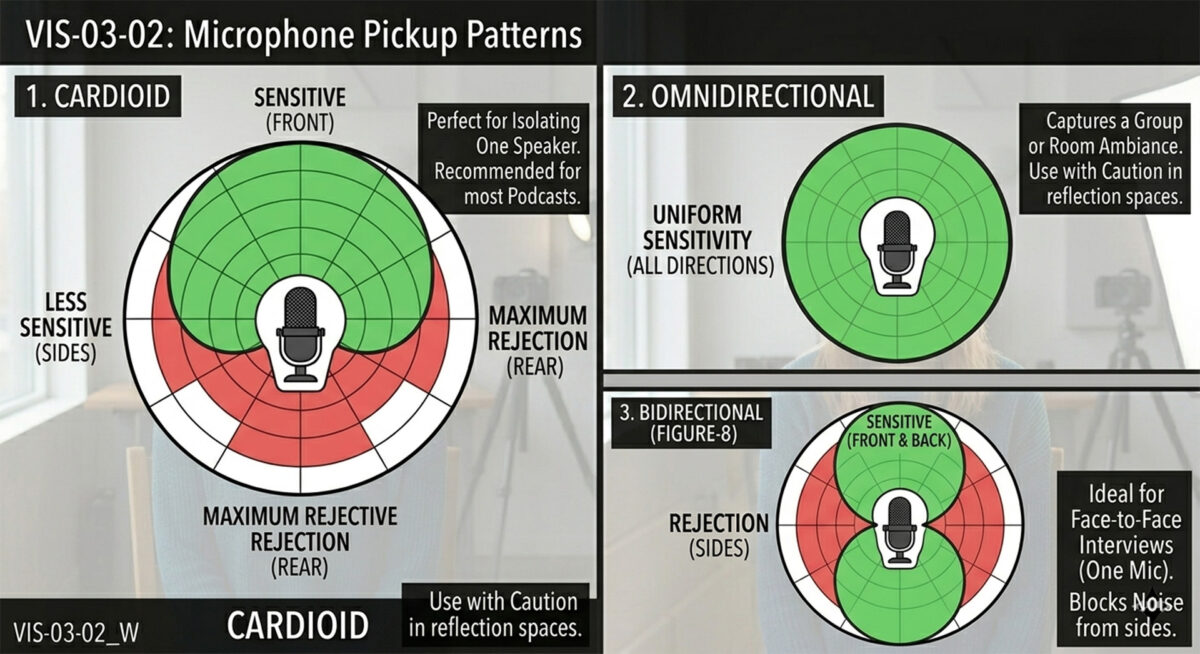
If you have multiple people and multiple microphones, you may have to adjust mic position and gain if some guests are loud and some are more soft-spoken. The better the balance during capture the less work you will have to do in post production.
As you can see, a cardioid mic will pick up less cross-talk than other mic types. This is why they are so common in radio and podcasting.
Problem 3: Multi-Camera Audio Sync
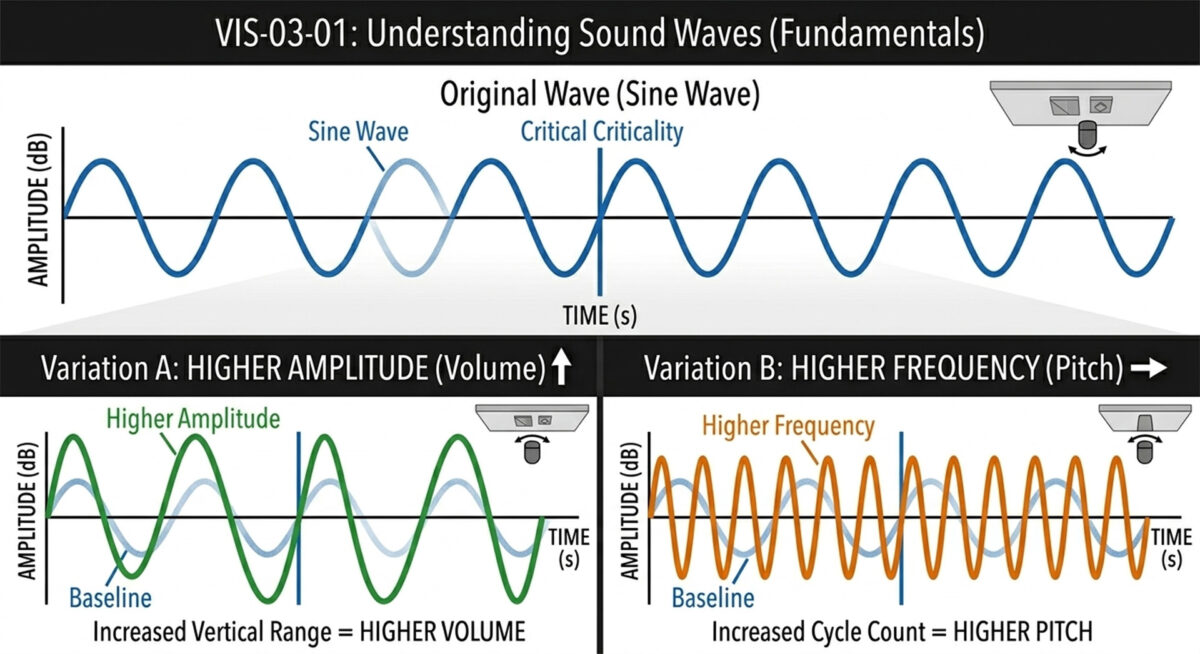
Always record audio into every camera through the built-in mic. This reference audio provides a matchable waveform. Create a sync point: clap your hands in view of all cameras. The spike appears on every track. In Resolve, align the spikes. You will be within a millisecond (J. Elias, 2026).
Step-by-step: (1) All cameras recording with built-in audio ON. (2) Stand in view of all cameras. (3) Clap twice. (4) Begin session. (5) Import all footage to Resolve. (6) Find clap spike on each waveform. (7) Align spikes. (8) Replace built-in audio with primary mic. (9) Verify lip sync.
Problem 4: Echo and Room Reflections
Diagnostic: clap once, loudly. If the clap rings, the room is reflective. Solutions: add soft furnishings, change rooms, move mic closer (radio DJs practically eat the mic), or install foam panels ($50-200).
Problem 5: Room Tone
Record 30 seconds of room silence before or after your session. If a car passes, start over. Use this to fill edit gaps in Resolve. Without it, gaps sound dead and unnatural. The Star Wars raw-edit lesson: audio clicking in and out before dialogue because room tone had not yet been added. Record at least 30 seconds to avoid cycling artifacts from short loops.
Problem 6: The Nightmare Scenario
Playback is terrible, guest has left. Triage: audio problems may yield to gain boost, compression, or noise reduction. Video problems may yield to crop, reframe, or color correct. If nothing works, consider audio-only release. If re-recording is needed, call the guest immediately, be honest, take responsibility. Prevention: always check recordings before the guest leaves.
| Scenario: The Buzzing Interview Fifteen minutes into a great interview, you hear a persistent buzz in your headphones. Check: is it on all tracks or just one? One track = cable/connection issue on that mic. During a natural pause, reseat the connection. All tracks = electrical interference. Unplug non-essential devices, move audio cables from power strips. Continue recording. Address residual buzz in Fairlight post. Do not stop the interview for more than 30 seconds. Momentum matters more than perfection. |
| Graduate Student Tip The 30-second playback check: after your test recording but before the real interview, put on headphones, close your eyes, and listen for 30 seconds. You will hear problems your brain filtered out: hum, echo, uneven levels, background noise. This one habit prevents more post-production headaches than any other practice in the course. |
Hands-On Exercise: The Room Diagnostic
- Sit in your recording space with headphones. Close your eyes, listen for 60 seconds. Write down every sound.
- Clap once. Note the echo response: sharp ping, long tail, or barely noticeable.
- Record 30 seconds of room tone. Play back at high volume. Can you hear a cycling point at 10 seconds?
- Record a hand clap on two devices simultaneously. Import both to Resolve and practice aligning the spikes.
Self-Check Questions
- What is the first step when you hear a persistent hum in your recording?
- What level should speech peaks reach on your audio meters?
- Why must every camera record audio through its built-in mic?
- Describe the hand clap sync technique step by step.
- How much room tone should you record, and why is 5-10 seconds insufficient?
- What should you always do before letting a guest leave?