Learning Objectives
After completing this lesson, you will be able to:
- Identify the five progressive equipment scenarios from smartphone to full professional production.
- Download and describe the purpose of DaVinci Resolve, OBS, and the Blackmagic Camera app.
- Recommend the single most impactful upgrade at each scenario level.
- Match a given budget and production goal to the appropriate equipment scenario.
- Explain why mastering lower-scenario fundamentals benefits producers at every level.
Vocabulary
| Term | Definition |
| DaVinci Resolve | Free professional video editing application by Blackmagic. Includes Fairlight audio engine, color grading, and visual effects. |
| OBS | Free open-source application for live streaming and recording. Mac and PC. |
| Blackmagic Camera App | Free iOS app providing full manual camera controls (ISO, white balance, shutter, fps) and rule of thirds grid. |
| Dongle | A small USB-C adapter routing phone signals to a laptop for recording or streaming. |
| Lavalier Microphone | Small clip-on mic worn 6-8 inches below the chin, centered on chest. |
| Audio Interface | Hardware converting mic signals to digital audio. Manages levels and routes multiple inputs to separate tracks. |
| Podcast Console | All-in-one device combining mic inputs, sound cues, sliders, Bluetooth, and streaming (e.g., Zoom PodTrak). |
| ATEM Mini | Blackmagic compact video switcher for multi-camera input, real-time switching, and streaming. |
| Codec | Compression algorithm reducing file size while maintaining quality. Presets in Resolve handle this automatically. |
| Theory Connection: Scaffolding + Theory of Margin The five scenarios are a deliberate scaffolding structure. Each builds on the skills of the one before it. You do not skip Scenario 1 because you own Scenario 3 equipment (Bierma, Fedeli, & Merriam, 2nd Ed., p. 403). This also applies McClusky’s Theory of Margin. A student overwhelmed by expensive, unfamiliar equipment has depleted their margin for learning actual production skills. Starting simple preserves cognitive capacity for what matters: understanding light, sound, framing, and content (Mayer, 2021). |
Core Concepts
Your Free Software Stack
Before spending money on hardware, download three free tools. DaVinci Resolve is a complete editing system with Fairlight audio and color grading. OBS handles live streaming. The Blackmagic Camera app replaces the iPhone’s default camera with full manual controls. All three are professional-grade and cost nothing (J. Elias, 2026).
The Five Scenarios at a Glance
| Scenario | Budget | Key Equipment | Software / Tools |
| 1. Smartphone | $0-15 | Phone, $15 tripod, books | Blackmagic Camera app, DaVinci Resolve |
| 2. Budget | $30-100 | + External mic, USB-C dongle | + OBS for streaming |
| 3. Intermediate | $500-2K | Dedicated camera, audio interface or podcast console, 2 mics | + Focusrite or Zoom PodTrak |
| 4. Advanced | $2K-10K+ | Multi-camera, ATEM Mini, individual mics, designed lighting | Full Resolve + streaming pipeline |
| 5. Professional | $10K+ | Full rig, crew, backup systems, monitoring | Industry standard suites |
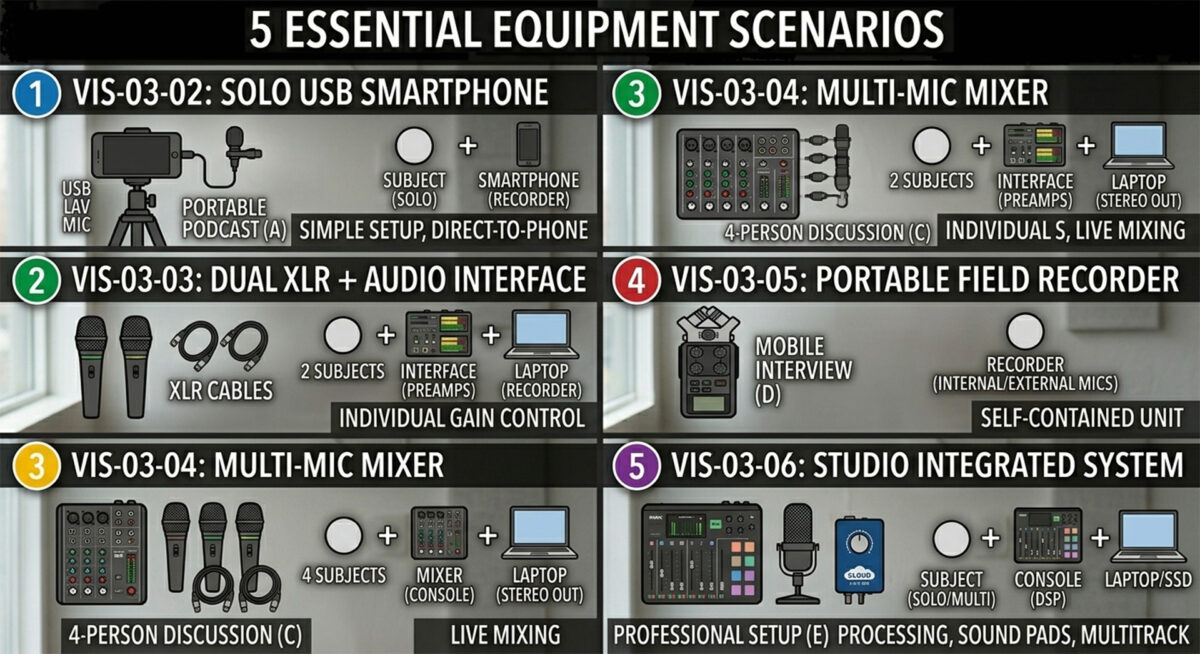
Scenario 1: Smartphone Essentials
Phone, table, two chairs. Stabilize on a $15 tripod or prop against books. Lens at eye level with seated subject. Use Blackmagic Camera app for the grid overlay and manual controls. Record 30-second test, play back with headphones. Control environment: close windows, turn off fans, silence phones.
Scenario 2: The Budget Upgrade
Add a $30-100 external microphone. Audio quality is the single most impactful upgrade. Lavalier: clip 6-8 inches below chin, centered. Table mic: 12-18 inches from speaker, top toward mouth. A USB-C dongle routes phone signal to laptop for DaVinci Resolve or OBS. Your setup is now wireless and portable.
Scenario 3: The Intermediate Setup
Dedicated camera, external mics, possibly a second camera. Camera 4-6 feet from subject at eye level. In-camera background blur becomes achievable. Focusrite interface (~$150) handles two mics on separate tracks. Zoom podcast consoles ($300-400) combine mic inputs, sound cues, sliders, Bluetooth, and streaming in one device.
Scenario 4: The Advanced Setup
Multiple cameras, individual mics, dedicated lighting, designed environment. Camera arrays with master wide and individual close-ups. Each mic on its own track. ATEM Mini handles multiple camera inputs, real-time switching, and one-button streaming with automatic resolution adjustment.
Scenario 5: Full Professional Production
Multi-camera, full lighting, individual monitoring, backup recording, crew. This scenario exists so you understand the ceiling, not because you need to reach it.
The Spielberg Principle
Steven Spielberg started in the 1950s with his father's home movie camera, rounding up neighborhood kids to shoot westerns. The tool does not make the creator. Do not let anyone tell you your phone is not good enough. If it works and you have something to say, use it (J. Elias, 2026).
| Scenario: The Graduate Student on a Budget You have an iPhone, a laptop, and fifty dollars. Download DaVinci Resolve, OBS, and the Blackmagic Camera app tonight (all free). Buy a lavalier mic ($30-50) and a phone tripod ($15). You are now at a solid Scenario 2 with professional software. Total investment under $65. Your capability exceeds what $5,000 bought ten years ago. Start recording. Make mistakes. Get better. |
| Graduate Student Tip Do not buy equipment before you need it. Start at Scenario 1 or 2. Record your first episode. Watch it back. You will immediately know what needs improving. Let your production experience drive purchasing decisions, not advertisements. The worst thing you can do is spend $2,000 on equipment you do not know how to use. That depletes your margin for learning the skills that actually matter. |